Practical playbook: AI ad creator branded video templates for high-velocity ad production
A practical playbook showing how AI ad creators + branded video templates create a repeatable, high-velocity ad production workflow for performance teams.

Performance teams need dozens of platform-native social ads every month, not one-off masterpieces. This playbook shows how to combine an AI ad creator with branded video templates to build a repeatable, high-velocity ad production workflow. Using "AI ad creator branded video templates" as the foundation, you’ll learn concrete systems for URL-first auto-population, multi-aspect exports, batch variation tactics, and the metrics cadence that keeps tests meaningful.
Read on if you run a small in-house studio, manage performance campaigns, or need to scale creative tests without exploding budgets.
Why branded video templates are the backbone of fast ad production
Branded video templates standardize creative decisions so the team can move from idea to publish at scale. A well-built template enforces visual hierarchy (logo placement, color, type), timing (hook, body, CTA), and production constraints (shot lengths, transitions) — which means fewer micro-edits and more iterations.
For performance marketers the point is not artistic perfection; it’s repeatable wins. Templates let you treat each ad like a data experiment rather than a bespoke deliverable. When a template exists for a UGC-style product demo, an influencer hook, or a benefit-driven cut, the team can spin out ten variants quickly by swapping copy, imagery, or music instead of rebuilding layouts.
This is why platform reviews and vendor guides emphasize template libraries and brand-kit enforcement. AdCreate’s ready-made libraries show how templates can cover common social formats. Teams that adopt template-first production reduce friction between strategy, creative, and media buying — and they can route budget toward testing hooks, not re-authoring each ad.
How modern AI ad creators auto-populate templates from product URLs and brand kits
Modern AI ad creators use URL-first flows that read product pages and auto-populate templates with copy, assets, and suggested scripts. Platforms including Predis.ai and Creatify (documented in vendor summaries) show how a product-URL import can produce script suggestions, hero shots, captions, and even music choices — creating ready-to-publish ad packages in minutes.
This automation matters because it removes the most repetitive steps: copy drafting, asset selection, and scene assembly. Instead of handing a brief to a video editor, teams drop a product URL into the AI ad creator, pick a template, and receive a near-complete draft. Many platforms also integrate brand kits so logos, color palettes, and fonts are enforced during generation, preserving brand consistency across hundreds of ads.
The practical payoff: a small team can generate dozens of product-specific drafts with consistent brand treatment without hiring additional editors. AE Studio’s case study shows that end-to-end AI-assisted workflows can cut production time significantly — a useful benchmark when you evaluate vendor speed and automation fidelity.

Designing template systems for platform-native social ads (TikTok, Reels, YouTube Shorts, Meta)
Templates must be platform-aware. A TikTok or Reels template prioritizes early visual hooks and native caption styles; a Meta feed ad benefits from 4:5 framing and clear mid-roll CTAs; Shorts demand tight vertical edits with punchy first three seconds. Designing templates with platform-native intent reduces friction on publishing and increases ad effectiveness.
Start by building a core template family per creative purpose (UGC demo, animated benefit, brand story). For each family, create variations across aspect ratios — 9:16 for TikTok/Reels/Shorts, 4:5 and 1:1 for Meta feed, and 16:9 for YouTube pre-roll. Many AI ad platforms automatically export one template across multiple aspect ratios, reflowing text and cropping assets to match platform layouts; this is a standard feature noted in platform documentation and reviews.
Also bake in micro-formats: captions (auto-captioning with editable text), on-screen CTAs, and subtitle-safe areas. A template system that accounts for microphone-friendly voiceover levels, motion intensity, and opening-frame readability will lift performance and reduce last-minute edits. Design with measurement in mind: include editable text layers or placeholders for testable hooks and clear CTA frames so ad ops can swap variables without touching composition.
A 6-step fast ad production workflow that mixes automation with human QC
A repeatable workflow prevents automation from producing low-quality or off-brand ads. Below is a six-step process that balances speed with human oversight.
1) Intake & Prioritization — Collect product URLs, brief (primary KPI), and target platforms. Use a shared spreadsheet or creative ops tool to prioritize SKUs and test hypotheses. URL-first flows let you skip manual asset uploads for many SKUs.
2) Auto-generate Drafts — Drop the product URL into your AI ad creator, select the appropriate template family, and let the platform auto-populate scripts, clips, captions, and music. This is where URL-to-video and brand-kit automation pays off.
3) Batch QC & Light Edits — A creative lead reviews generated drafts in batches. Check brand-kit fidelity, hook clarity, and caption accuracy. Make lightweight edits (swap music, tighten timing) rather than full re-edits.
4) Variant Generation — Use parameterized templates to produce controlled variants: swap the hook line, change CTA copy, or toggle product shots. Export multi-aspect packages so each ad has platform-native versions.
5) Preflight & Publish — Run a checklist: captions, aspect-safe cropping, audio levels, and pixels/tracking tags. Use platforms with direct publishing or ad cloning to save time.
6) Post-launch Monitoring & Iteration — Monitor CTR, retention curves, and conversion lifts. Feed winners back into the template library for future campaigns.
This workflow leans on automation for scale but preserves human judgment where it matters: hook selection and QC. Use PlayVideo.AI to generate the initial videos (/create-video), create supporting images (/create-image), and build custom audio or music tracks through your workflow (/create-music). For voiceovers or localization, integrate AI voices to keep iterations fast (/ai-voices).
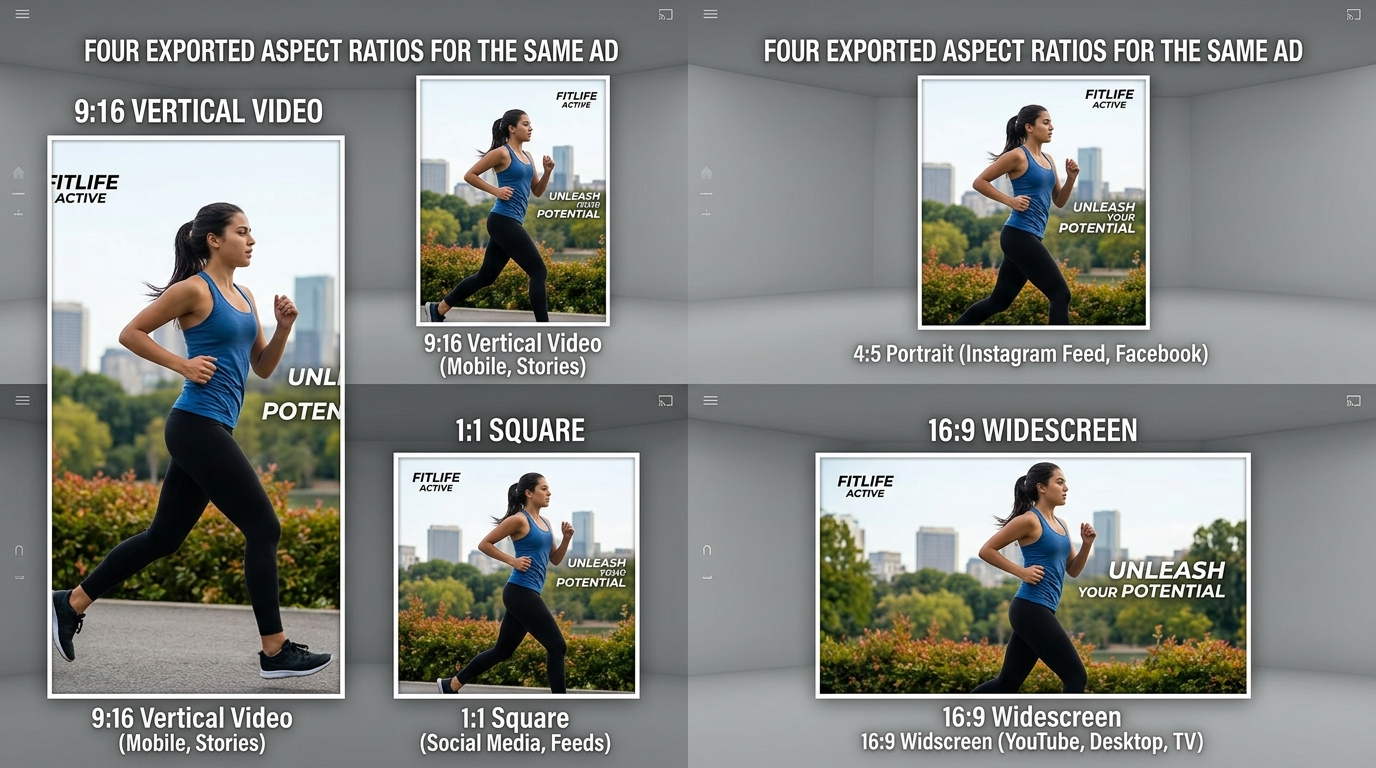
Template automation tactics that increase variation velocity (hooks, lengths, captions, aspect ratios)
High-velocity testing depends on generating many high-quality, controlled variations. Parameterized templates are the principal tactic: think of templates with named fields (HOOKA, HOOKB, CTATEXT, PRODUCTSHOT_1) that automation can swap at scale. This lets you run orthogonal tests — e.g., test three hooks x two CTAs x two music tracks — while keeping visual composition consistent.
Common automation tactics to adopt:
- Hook permutations: Prepare an input list of short punchy hooks and let the platform generate variants automatically. Hooks should be A/B tested in the first 1–3 seconds.
- Length variants: Create 6s, 15s, and 30s exports. Many AI platforms support multi-length exports from a single template and will reflow content appropriately.
- Auto-captioning and localization: Enable captions by default and use AI voiceovers or TTS to create localized audio quickly. This broadens testing across regions without re-recording.
- Aspect-ratio reflow: Export 9:16, 4:5, 1:1, and 16:9 at once to ensure the same creative is optimized per placement. Platforms like AdCreate and others document multi-aspect export as a time-saver.
- Parameterized product shots: If you have multiple hero images or clips per SKU, set the template to swap in product assets programmatically.
Combine these tactics with batch export features to create hundreds of variants in hours instead of weeks. Use PlayVideo.AI’s effects suite for motion or viral templates (/effects) to add trend-friendly treatments conservatively — ensure treatments don’t violate brand rules.
Metrics, A/B test cadence, and creative-ops rules for scaling template-driven ads
Template-driven production scales testing, but scale without guardrails wastes budget. Define clear metrics and a cadence for moving winners through the funnel.
Primary metrics to track per variant: 3–10s view rate (retention), click-through rate (CTR), add-to-cart or landing conversion (for e-commerce), and CPA. Early-stage decisioning should prioritize retention and CTR; later-stage decisions require conversion metrics.
A suggested test cadence:
- Launch an initial batch of 12–24 variants per SKU across platforms.
- Run for a minimum of 48–72 hours or until each variant hits a statistically reasonable sample (platforms differ; aim for 1–2k impressions as a basic rule of thumb for early signals).
- Promote the top 10–20% of variants into a second wave with higher budget and more granular platform targeting.
Creative-ops rules to enforce:
- Minimum viable sample rule: Don’t kill variants before they reach minimum impressions unless they’re off-brand or technically broken.
- Winner criteria: Define thresholds for CTR uplift and conversion lift that qualify a variant to scale (e.g., +15% CTR and non-worse CPA).
- Catalog wins: Add scaled variants back into the template library as "proven" configurations to speed future production.
Use analytics to feed creative decisions into templates: if a specific hook pattern consistently outperforms, add it as a default hook slot in the template family. Tie your ad platform metrics to your production tracker so you automate the promotion of winners when they meet the rules.
Vendor checklist: what to evaluate when picking an AI ad creator and template platform
When selecting a vendor, test for both automation speed and the fidelity of brand enforcement. Evaluate each vendor against these criteria before you commit:
- URL-first generation: Can the platform import a product URL and auto-populate scripts, assets, and captions reliably? Predis.ai and Creatify exemplify URL-to-video flows.
- Template library breadth: Are there ready-made templates for UGC, motion, and product-focused cuts? Check how many social-native templates are available.
- Brand-kit enforcement: Does the platform apply logos, colors, and fonts consistently across exports? Test with your brand assets to measure fidelity.
- Multi-aspect export & reflow: Can one template export 9:16, 4:5, 1:1, and 16:9 cleanly without manual re-editing? Many reviews highlight this as an essential time-saver.
- Variation and parameterization: Does the platform support parameterized templates that can swap hooks, CTAs, and product shots programmatically?
- Audio & localization: Are there text-to-speech options, AI voiceovers, or easy music generation? Use /ai-voices for voiceover testing and /create-music for scoring experiments.
- Integrations & publishing: Can the tool publish directly or clone ads into major ad platforms? Integrations with ad accounts and analytics speed end-to-end operations.
- Enterprise features: Team roles, asset security, and version history are must-haves for agency or brand teams.
- Speed & cost: Time-to-first-draft and per-variant cost affect your throughput. Compare savings to benchmarks like AE Studio’s reported time reductions.
During trials, run a POC: feed ten product URLs, generate templates, and measure time-to-ready and brand fidelity. Use PlayVideo.AI to prototype quickly via the video generator (/create-video) and export platform-native variants.
Frequently Asked Questions
How fast can a team realistically produce platform-ready ads using this approach?
With URL-first templates and brand kits, teams can produce initial drafts in minutes per SKU. End-to-end (QC, variants, and multi-aspect exports) a realistic target is under 3 hours per SKU for a batch workflow — consistent with vendor case studies that report similar time savings after automation.
Will auto-generated ads feel repetitive to audiences?
Not if you design parameterized templates and rotate hooks, music, and product shots. The goal is controlled variation: same layout but distinct messaging and motion so algorithms see fresh creatives while production stays efficient.
Which platforms benefit most from template automation?
All major social platforms benefit, but vertical-first short-form platforms (TikTok, Reels, Shorts) see the largest gain because early hooks and captioning are critical. Multi-aspect export also makes Meta feeds and YouTube pre-roll easier to support without extra edits.
Conclusion
Start small and instrument everything. Run a four-week pilot: pick 5–10 SKUs, create template families for two creative purposes, and run the 6-step workflow. Track time-to-draft, impressions to decision, and CPA lift. Use that data to decide which templates become standard in your library and which vendor features to prioritize.
Operationally: enforce brand-kit checks in QC, automate what’s repetitive (URL import, multi-aspect export, captioning), and keep humans focused on hooks and performance decisions. If you need to prototype fast, generate videos with PlayVideo.AI (/create-video), produce supporting images (/create-image), and test audio variants using the music and voice tools (/create-music, /ai-voices). Finally, evaluate vendors against the checklist above and run a short POC that measures speed, template fidelity, and integration fit. That disciplined approach converts template-driven production from a cost center into a growth lever.
Related on PlayVideo.AI: